
Loading...

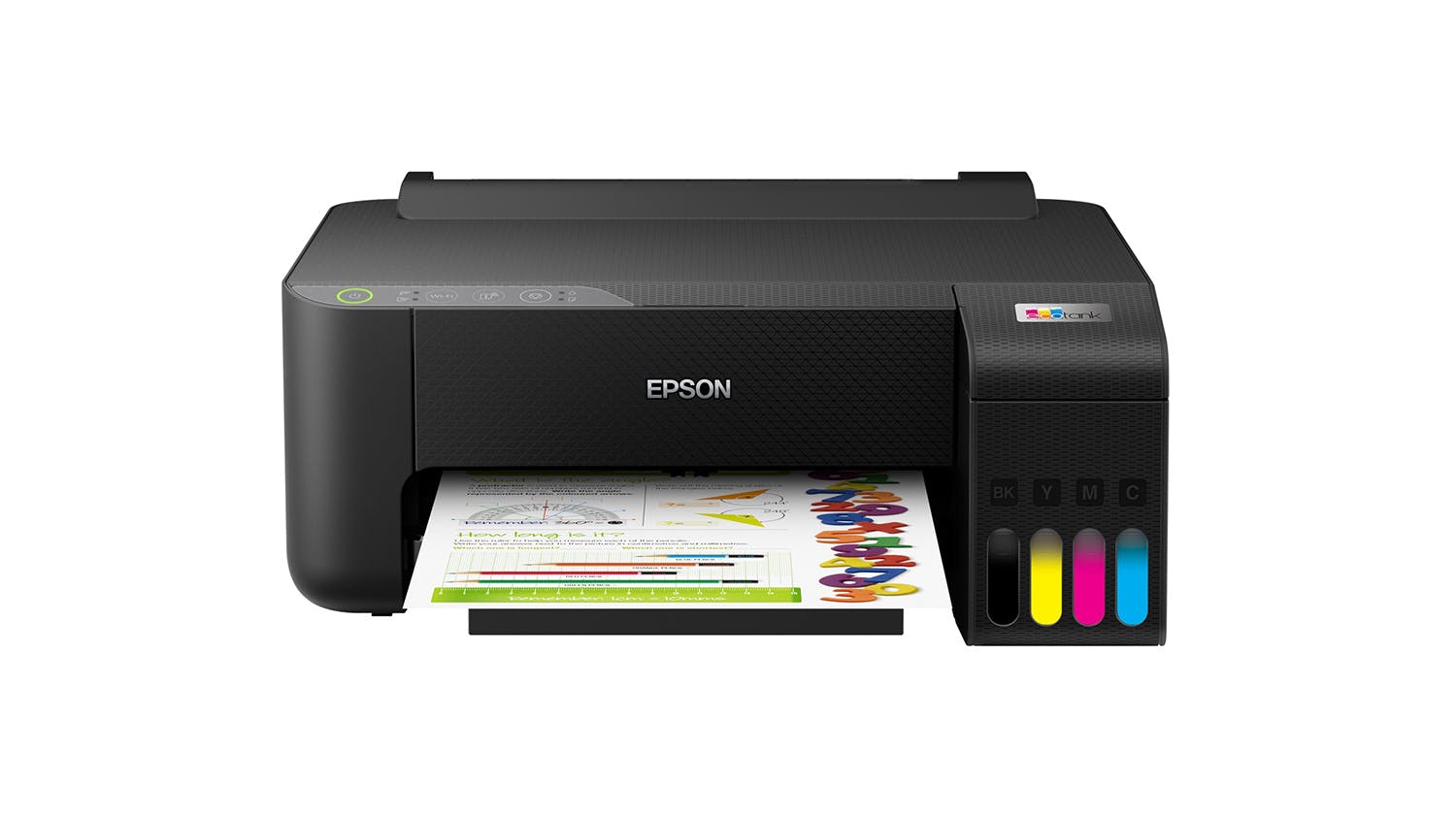
Epson EcoTank ET-1810 Printer

Epson EcoTank ET-1810 Printer

$205

Epson EcoTank ET-1810 Printer

C11CJ71501
Epson EcoTank ET-1810 Printer
Shortlist Compare
Bonus
$205

$60 Harvey Norman Bonus Gift Card!

Find in Store
Description

$60 Harvey Norman Bonus Gift Card!

Achieve exceptional outputs on every print using the Epson EcoTank ET-1810 Printer. This versatile unit offers cartridge-free printing and easy-to-fill, supersized ink tanks to accommodate all of your printing needs. It also showcases a compact form factor, allowing you to save space while providing you with the same functionalities. In addition, this Epson EcoTank printer comes with wireless connectivity for ease of use.

Key Features

  • Superior Printing Capabilities: The Epson EcoTank ET-1810 Printer features cartridge-free printing and integrates a high capacity ink tank system to provide you optimum performance on every sheet. It also has an ink palette comprised of cyan, magenta, yellow, and black shades, letting you print pristine monochrome or coloured outputs (replacement ink bottles are sold separately).
  • Compatible Paper Sizes and Type: It is compatible with various sizes such as Legal, Letter, 8.5" x 13", A4, B5, A5, A6, B6, and even measurements of 182mm x 257mm to 215.9mm x 297mm. You can also use a variety of papers like plain paper, photo-quality Inkjet paper, Epson matte paper, and Epson glossy photo paper.
  • Swift Printing Speeds: Epson EcoTank ET-1810 Printer offers printing speeds of 5ppm for coloured and 10ppm for black outputs.
  • Stellar Print Resolution: It can deliver crisp text and vibrant outputs at 5760 x 1440 resolution, allowing you to enjoy superb prints whether you'll be printing documents, photos, or even envelopes.
  • Generous Capacity: Print stacks of pages without interruption using ET-1810! It's paper tray input capacity can support up to 100 sheets and handle sizes of up to A4.
  • Smooth-Sailing Connectivity: Thanks to this Epson printer's wireless connectivity, 2.4 GHz wireless frequency bands, and 802.11g/b/n supported IEEE standards, you can easily print files from various compatible devices such as tablets and smartphones. It also comes with a USB 2.0 port to give you a wired connectivity option.
  • App-Enabled Printer: By downloading the Epson Smart Panel app (available on both Android and iOS devices), you can have access to additional features straight from your hand-held device. It also allows you to monitor your printer, or even remotely print and scan.
  • Broad Compatibility: This Epson EcoTank ET-1810 Printer is compatible with Epson T522 replacement ink bottles. It also utilises an exclusive auto-stop ink bottle (sold separately), which is uniquely keyed for easy filling of each colour. In addition, this device works with operating systems such as Windows 11, 10, 8, 8.1 (32-bit, 64-bit), 7 (32-bit, 64-bit), Vista, and Mac OS X 10.6.8 to Mac OS X 10.15.x3.
Specifications
All Product Details
Brand Epson
Product Type Ink Tank Printers
Model Number C11CJ71501
Printer
Functions
  • Print
Compatible Ink Cartridges/Toners Epson T522
Compatible Paper Sizes Legal, Letter, 8.5" x 13", A4, B5, A5, A6, B6, user definable (182mm x 257mm – 215.9mm x 297mm)
Compatible Paper Types Plain Paper, Photo Quality Inkjet Paper, Epson Matte Paper, Epson Glossy Photo Paper
Printer USB Cable Not Included (Sold Separately)
Print
Print Resolution 5760 x 1440
Document Print Speed Colour: 5ppm, Black/White: 10ppm
Ink Type (Colour) Dye
Ink Palette Cyan, Magenta, Yellow, Black
Paper Input Capacity 100 Sheet
Duplex Printing No
Maximum Print Size A4
Number of Paper Tray 1
Photo Printing Yes
Envelope Printing Yes
Connectivity
Wired / Wireless Wireless
Wireless Frequency Bands 2.4 GHz
Supported IEEE Standards 802.11g/b/n
Connectivity Type Wi-Fi
Dimensions
Product Width 37.5 cm
Product Depth 34.7 cm
Product Height 16.9 cm
Product Weight 2.7 kg
Warranty
Manufacturers 12 Months
Reviews

Expert Reviews


Customer Reviews


Epson EcoTank ET-1810 Printer is rated 4.6 out of 5 by 113.
Rated 5 out of 5 by from Sublimation printer. We bought this printer to turn into a sublimation printer. Works 100% perfectly. Great product would purchase again.
Date published: 2022-02-17
Rated 5 out of 5 by from Epson's versatile printer, its great. The Epson EcoTank ET-1810 Printer is a really great printer. This is our second printer - yes the very same model - and no it didn't break. Its for doing Cricut as the printer is so versatile we knew it would be perfect for sublimation. In fact Epson is recommended for Cricut as they make desktop printers that are suitable for sublimation printing onto various blanks. Whether you are into sublimation or just want a desktop printer that is cost effective and is a great printer this is the printer I would recommend.
Date published: 2022-01-23
Rated 5 out of 5 by from Best value for money printer around Excellent printer value for money,reliable and ink usage is really economical
Date published: 2022-01-22
Rated 4 out of 5 by from Good cheap Ecotank Brought this for sublimation. was easy to change and set up, but a bit of a task to connect wireless. Took a frustrating 2 hours to get it working. Great cheap printer, does what it needs to do
Date published: 2022-05-13
Rated 5 out of 5 by from Great Using for sub and working really well. Love it :))
Date published: 2024-03-07
Rated 5 out of 5 by from Easy to use It was very easy to set up. The ink looks like it will last for a long time. It’s easy to use. Prints well.
Date published: 2022-01-25
Rated 5 out of 5 by from Epson Ecotank printer Excellent very reasonably priced inkjet printer with ink tanks not cartridges. Excellent print quality.
Date published: 2021-12-08
Rated 5 out of 5 by from Online ordering Online purchase was easy and delivery was super quick. Product is fantastic
Date published: 2022-01-17
  • y_2025, m_12, d_3, h_9
  • bvseo_bulk, prod_bvrr, vn_bulk_3.0.42
  • cp_1, bvpage1
  • co_hasreviews, tv_27, tr_86
  • loc_en_NZ, sid_76636, prod, sort_[SortEntry(order=RELEVANCE, direction=DESCENDING)]
  • clientName_harvey-norman-en_nz
  • bvseo_sdk, p_sdk, 3.2.1
  • CLOUD, getContent, 298.76ms
  • REVIEWS, PRODUCT
Delivery
Delivery

We aim to dispatch orders within 2 days. Delivery costs are calculated based on your location and the size of your order. Furniture may take up to 8 weeks to deliver as most products are made specifically for your order. Some Customer Direct products are shipped from overseas and may take longer to arrive. Some goods may take longer to deliver if a product is currently not in stock. A staff member will contact you where this occurs.

Easy returns

If you feel your product has failed a Consumer Guarantee (as defined by New Zealand Consumer Law) then don't worry you can easily return it to your local Harvey Norman store. We'll even pay for the postage if you live in an area where there is no store. Our returns policy covers any purchased item ( conditions apply).

What's in the box
  • Epson EcoTank ET-1810
  • Instruction manual
  • CD-ROM for product setup
  • Power cord
  • Initial ink bottles: 522 Black, 522 Cyan, 522 Magenta & 522 Yellow
Terms & Conditions
Pricing Terms

Limit 2 per customer. Personal shoppers only. Trade not supplied. Available from 6pm Wednesday 3rd December 2025 until midnight Tuesday 16th December 2025.

Offer Terms

Harvey Norman Bonus Gift Cards are issued on receipt of goods and expire 2 Months from date of issue. Bonus gift cards are not redeemable for cash and cannot be used in the transaction in which it is issued. If goods are refunded, then the gift card must be returned (if unused) or the value of the gift card must be deducted from the refunded amount. See www.harveynorman.co.nz/gift-card-terms-and-conditions.html or in-store for terms and conditions. Offer ends 5:59pm Tuesday 16th December 2025.

Questions & Answers

Can this print on sublimation paper

Asked by: Zahh
Thanks for your question. Others have asked this previously. EcoTank these can only be used for sublimation if the printer is brand-new and has not yet been filled with standard ink. Simply inject the sublimation ink into your EcoTank printer using the provided syringes. You cannot use it for normal printing after doing so, and if already used for normal prints, cannot be changed. Trust this helps! ^CO
Answered by: HN Customer Service
Date published: 2024-10-19

does this printer copy and scan

Asked by: Noodle123
Thanks for your question. This particular model is just a printer, and does not have scanning capabilities. Trust this helps! ^CO
Answered by: HN Customer Service
Date published: 2024-12-14

Hi, It's a little unclear if this printer can scan and send to email items? One answer says yes and another answer says no.

Asked by: cath_123
Great question Cath. This particular model is just a printer, and does not have scanning capabilities. The 'scan' feature on previous answers is an app feature, and we will have this updated. Hope this helps clarify! ^CO
Answered by: HN Customer Service
Date published: 2024-04-08

Is there any other way to setup than cd

Asked by: Raniera
Thanks for your question. Yes, without the CD you can find the relevant driver software on the Epson NZ website directly. Click 'Support & Downloads' at the top of the page, click your printer model on the page, and click the 'Downloads' tab. From there find your operating system to download the relevant software. Hope this helps! ^CO
Answered by: HN Customer Service
Date published: 2024-03-21

double sided print?

Asked by: George
Thanks for your question. This model does not have a duplex or double-sided print feature, and is for single pass only. Trust this helps clarify. ^CO
Answered by: HN Customer Service
Date published: 2024-02-10

Can this printer print on cardstock? It looks like it prints flat from the pictures but just making sure.

Asked by: Kenzie
Thanks for your question Kenzie. Epson state it can print on normal 80gsm printer paper, Epson 102gsm Photo Quality Inket Paper, Epson 167gsm Matte Paper, and Epson 200gsm Glossy Photo Paper. We would not advise using other types of media outside of what's listed, as this could cause problems that can impact warranty. Trust this helps! ^CO
Answered by: HN Customer Service
Date published: 2024-01-30

Is this a sublimation printer?

Asked by: Dice
Thanks for your question Dice. All EcoTank printers can only be used with sublimation ink if the printer is brand-new and has not yet been filled with other ink. Simply inject the sublimation ink into your EcoTank printer using the provided syringes. You cannot use it for normal printing after doing so, and if already used for normal prints, cannot be changed. Trust this helps! ^CO
Answered by: HN Customer Service
Date published: 2024-01-10

Is this printer a sublimation printer

Asked by: Kat128
Thanks for your question Kat. Yes, all EcoTank printers can only be used with sublimation ink if the printer is brand-new and has not yet been filled with other ink. Simply inject the sublimation ink into your EcoTank printer using the provided syringes. You cannot use it for normal printing after doing so. Trust this helps! ^CO
Answered by: HN Customer Service
Date published: 2024-01-04
  • y_2025, m_12, d_3, h_9CST
  • bvseo_bulk, prod_bvqa, vn_bulk_3.0.42
  • cp_1, bvpage1
  • co_hasquestionsanswers, tq_17
  • loc_en_NZ, sid_76636, prod, sort_[SortEntry(order=LAST_APPROVED_ANSWER_SUBMISSION_TIME, direction=DESCENDING)]
  • clientName_harvey-norman-en_nz
  • bvseo_sdk, p_sdk, 3.2.1
  • CLOUD, getContent, 76.68ms
  • QUESTIONS, PRODUCT
Product Care
With Product CareTM you can relax knowing Your purchase comes with additional protection.

Discover all the benefits Product CareTM brings you:
Certainty

With Product CareTM you have certainty that your product is covered for a specific period of time. If, during the Product CareTM term, your product fails to operate as a result of an Eligible Fault*, we will provide a one-off replacement of Your Product.

Support

Our experienced support team ensures that the assessment, replacement or remedy process under your Product CareTM is a convenient experience. Whether you are experiencing a product fault or needing toll free technical assistance, our team is here to provide support every step of the way.

Advantage

Redeem exclusive Additional Benefits which will help you maintain your product and assist in an additional purchase.


There are exclusions and limitations to Product CareTM. This section should always be read in conjunction with the Terms and Conditions for Product CareTM.

Learn more about Product CareTM.

Terms & Conditions

Pricing Terms

Limit 2 per customer. Personal shoppers only. Trade not supplied. Available from 6pm Wednesday 3rd December 2025 until midnight Tuesday 16th December 2025.

Offer Terms

Harvey Norman Bonus Gift Cards are issued on receipt of goods and expire 2 Months from date of issue. Bonus gift cards are not redeemable for cash and cannot be used in the transaction in which it is issued. If goods are refunded, then the gift card must be returned (if unused) or the value of the gift card must be deducted from the refunded amount. See www.harveynorman.co.nz/gift-card-terms-and-conditions.html or in-store for terms and conditions. Offer ends 5:59pm Tuesday 16th December 2025.

Recommended for you

Please confirm your selection

Store Picker

Travel Mode

Stores