- Cart is empty

Galaxy Buds4 Pro
Iconic metal design. Shaped for all-day comfort
The real metal blade defines both design and control. Finely sculpted from aluminium, Galaxy Buds4 Pro shines elegantly, turning heads. Finished in timeless colours, it presents a classic look that feels sophisticated yet versatile. Shaped for lasting comfort and stability, the surface that touches your ears feel naturally comfortable to provide a secure fit. From docking and charging to control, every interaction flows seamlessly through an ergonomic design.

*Image simulated for illustrative purposes. Actual UX/UI may be different.
Refined colours to match with your tunes

*Image simulated for illustrative purposes. Actual UX/UI may be different.
*Availability of colors may vary by country or carrier.

*Image simulated for illustrative purposes. Actual UX/UI may be different.
*Availability of colours may vary by country or carrier.
Designed for ease, crafted for beauty
Check that Galaxy Buds4 Pro is properly in place through the translucent cover. Charge wirelessly and simply take it anywhere — its compact, lightweight design makes it easy to carry.

*Image simulated for illustrative purposes. Actual UX/UI may be different.
*Wireless charger and cable sold separately.
Hi-Fi sound. Hear the full range
Meet the true Hi-Fi Galaxy Buds. The 2-way Speaker is now advanced with a wider woofer, and is paired with dedicated Dual Amp — meticulously tuned to achieve high-fidelity sound across the full spectrum. Bring the studio-scale listening system to your ears, wherever you are.
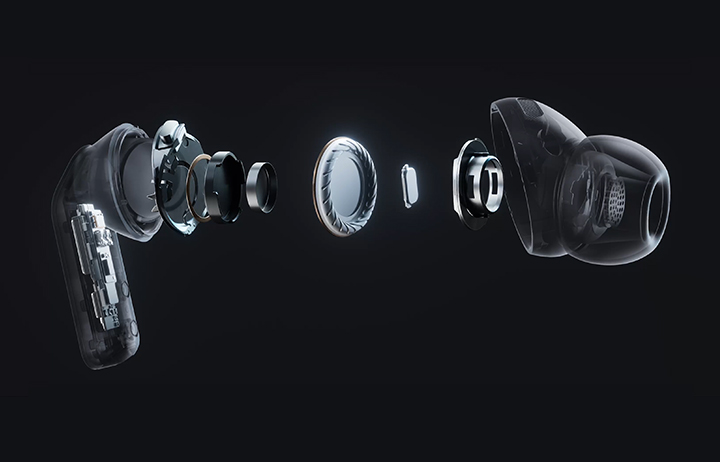
*Image simulated for illustrative purposes. Actual UX/UI may be different.
*The new wider woofer on Galaxy Buds4 Pro has 19.8% larger diaphragm compared to Galaxy Buds3 Pro.

2-way Speaker
Two separate drivers — the newly designed wider woofer with an expanded diaphragm area, and a precision tweeter — are expertly aligned to reproduce sound that remains faithful to the original recording. The advanced 2-way Speaker delivers a full-range performance, from deep, textured sub-bass to airy, extended highs, while preserving natural bass resonance with faster transient response, a rich midrange body and sharp detail.

Dual Amplifier
Listen to your playlist in peace with Siren Detect. Galaxy Buds3 Pro blocks off unnecessary external noise, except for alarms and sirens, to warn you to steer clear of harm's way.
Hear every layer come alive
Hear every layer come alive with extended bit depth and high sampling rates. Samsung Seamless Codec (SSC) supports 24-bit / 96 kHz audio to preserve the original sound with vast amount of information, while optimized data transmission control enables a stable listening experience with reduced audible artifacts or dropouts. Turn on the Ultra High Quality Audio (UHQ) option on your Galaxy smartphone and rediscover your favourite songs in full detail.

*Image simulated for illustrative purposes. Actual UX/UI may be different.
*Devices sold separately.
*Ultra High Quality Audio (UHQ) up to 24-bit / 96 kHz is available on Galaxy S26 Series, S25 Series, S24 Series, S23 Series, Z Fold7, Z Flip7, Z Fold6, Z Flip6, Z Fold5, Z Flip5 and Tab S11 Series, Tab S10 Series, Tab S9 Series with One UI 6.1.1 or above. Additional devices may be supported in the future.
*UHQ is off by default and can be configured directly in the phone settings for devices running One UI 8.0 and later. For devices running on earlier versions of One UI, configurations can be found in the Galaxy Wearable app.
Super Clear Call, even in noise
Even your calls are clear like Hi-Fi audio. Your voice is clearly captured by 6 microphones positioned around your head, intelligently isolating it from the background sound with advanced Deep Neural Network (DNN). The exceptionally clean voice signal is transmitted with pure effortlessness through Super Wideband (SWB) up to 16 kHz between your Galaxy Buds4 Pro and Galaxy smartphone. Hear and be heard, loud and clear — even in noisy moments.

*Image simulated for illustrative purposes. Actual UX/UI may be different.
*Devices sold separately.
*Super wideband (SWB) call is available on Galaxy S26 series, S25 series, Z Fold7, Z Flip7, Z Fold6, Z Flip6, A56, Tab S11 series and Tab S10 series with One UI 6.1.1 or above. Additional devices may be supported in the future. Super wideband call is available regardless of the call app. SWB may not be supported depending on the mobile network between devices.
Surround yourself in sound
Expand your soundstage from stereo into a grand orchestral hall or a large arena, placing you at the center of a live performance with a single touch. Feel every instrument and vocals in three dimensions, surrounding you with natural depth and spacious clarity. You don't just hear the music — you're enveloped by the atmosphere all around you.

*Image simulated for illustrative purposes. Actual UX/UI may be different.
*Contains AI-generated images with post-editing applied.
*360 Audio is only available on Samsung Galaxy smartphones and Galaxy Tab devices with Android One UI version 3.1 or later, and selected Samsung TV models. Supported Samsung TV models include: Neo QLED 8K (QN900D, QN800D), Neo QLED 4K (QN95D, QN90D, QN87D, QN85D), OLED (S95D, S90D, S85D), QLED (Q80D, Q70D). Support for 360 Audio and head tracking may vary depending on the application and content.
Let Hi-Fi sound stay vivid
With its top-notch high-fidelity sound system, Galaxy Buds4 Pro achieves precise noise control. Distractions fade in real-time as the Active Noise Canceling (ANC) algorithm instantly processes and adapts to your ear shape and fit. Listen to vivid, layered and deeply engaging Hi-Fi sound wherever you are.

*Image simulated for illustrative purposes. Actual UX/UI may be different.
Your AI, hands-free
Ask for assistance with just your voice ― no phone-pulling required. Simply speak to AI agents such as Bixby to get answers to questions or manage tasks instantly without slowing you down.

*Image simulated for illustrative purposes. Actual UX/UI may be different.
*Voice wake-up is off by default, and can be configured directly in the phone settings for devices running One UI 8.0 and later. For devices running on earlier versions of One UI, configurations can be found in the Galaxy Wearable app.
*Bixby is supported on most Samsung Galaxy smartphones and Galaxy Tab devices. Bixby provides real-time answers on devices running on One UI 8.5 or later. Service availability may vary by country, service provider, device model and OS version.
*Bixby supports 9 languages: Korean, English, German, French, Italian, Spanish, Portuguese, Chinese (Simplified) and Japanese.
Personal AI Translator in your ear
Break language barriers with a personal AI translator in your ear. Fully engage in the moment with Galaxy AI-powered Interpreter — hear it through Galaxy Buds4 Pro and read it on your Galaxy smartphone. Galaxy AI steps in to ensure clear communication across different languages.

*Image simulated for illustrative purposes. Actual UX/UI may be different.
*Devices sold separately.
*Interpreter is available on smartphone devices with Galaxy AI features included, running on One UI 6.1.1 or later.
*Galaxy AI basic features provided by Samsung are free. Enhanced features or new services may require payment. Galaxy AI basic features are those services listed under 'Advanced Intelligence' in the current Samsung Services Terms and Conditions - see details: https://bit.ly/galaxyaiterms. Different terms may apply for AI features provided by third parties.
*Galaxy Buds4 supports Galaxy AI features such as Interpreter and Live Translate when paired with compatible Samsung Galaxy devices. Availability of Galaxy AI features may vary by device model. Supported languages (Regions) are Arabic, Bahasa Indonesia, Chinese Simplified, Chinese Traditional (Hong Kong, Taiwan), Dutch, English (Australia, India, United Kingdom, United States), French (Canada, France), German, Hindi, Italian, Japanese, Korean, Polish, Portuguese (Brazil, Portugal), Romanian, Russian (Russian Federation), Spanish (Mexico, Spain, United States), Swedish, Thai, Turkish, Vietnamese, Tagalog, Gujarati. More languages will be added in future updates.
Now, everything flows as one in One UI
The evolved One UI 8.5 creates a deep connection between your Galaxy Buds and Galaxy smartphone, almost like a duet. Control has never been more intuitive — manage features from the device settings, without downloading a separate app. From the Quick Panel, you can easily access features and also set and save sound preferences for each app.

*Image simulated for illustrative purposes. Actual UX/UI may be different.
*Devices sold separately.
*Samsung Account login is required to activate and change Galaxy Buds4 Pro settings. For devices running on One UI 8.0 or later, settings can be configured directly in the phone settings. For devices running on earlier versions, configurations can be found in the Galaxy Wearable app. Additionally, to use the Galaxy Wearable app, Samsung Galaxy Buds4 Pro must be paired with a smartphone running Android 12.0 or above with at least 1.5 GB of memory. Galaxy Wearable app is not supported on iOS.
*Connecting Samsung Galaxy Buds4 Pro as Bluetooth Audio is available regardless of the OS.